
Coming soon to Mac
Spookle
Your Mac's friendly ghostbuster.
A tiny menu-bar app that finds the ghost processes, orphaned node processes and forgotten dev servers your AI coding agents leave behind, and clears them safely in one click.

The problem
AI agents are great. Their ghosts are not.
Coding agents spin up dev servers, MCP servers, sub-agents and node chains. When a session ends or crashes, a lot of that keeps running with no parent, holding ports and eating RAM, CPU and battery.
Combined: ~7.75 GB RAM, ~40% CPU wasted
Cursor kept draining my MacBook
Biome stuck at 900% CPU, orphaned node processes, a next-server eating 9 GB+
I'm tired of Claude Code spinning up a new dev server every 5 seconds and forgetting all of them.
3 days later: "port 3000 is already in use"
It's not one vendor. Cursor, Codex, Gemini and friends leave ghosts too, and the usual fix is lsof -i :3000, squinting at a PID and hoping kill -9 hit the right thing.
How it works
Find. Catch. Relax.
Free up stuck ports and clear orphaned processes on your Mac in three steps, without hunting for PIDs.
-
Find
Spookle sits in your menu bar and spots orphaned agent processes, tells you which agent likely left them, how old they are and how much memory they hold. Dev servers show up by port, repo and branch, not by PID.
-
Catch
Kill one row, or hit "Kill all ghosts". Spookle stops the whole process tree gently first, and only forces it if it won't quit. Bulk kills always show you a list to confirm.
-
Relax
Turn on the auto-reaper to clean up at login, on a schedule or when an agent session ends, and get a heads-up when something starts hogging RAM, CPU or battery.
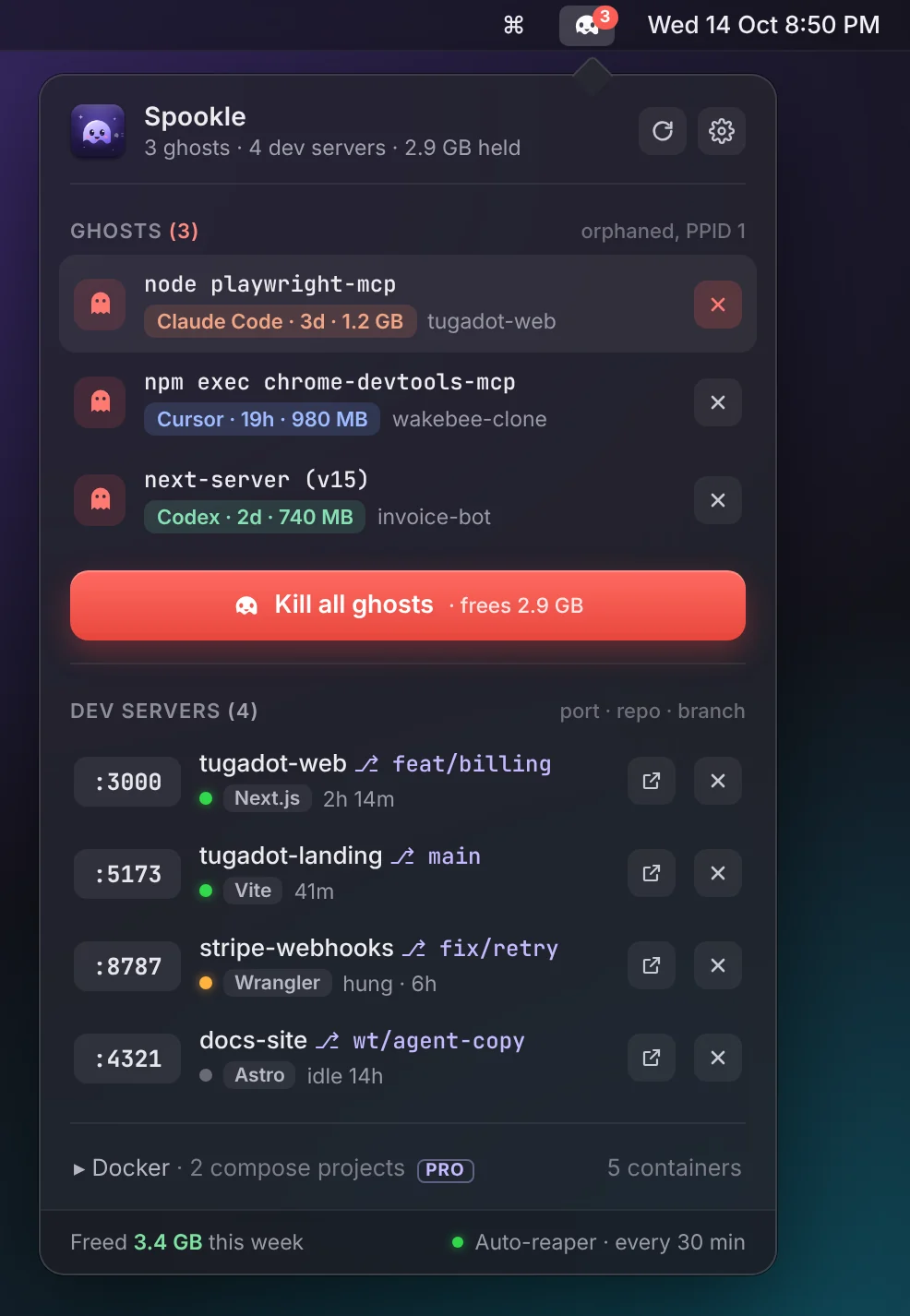
Design mockup. All names and numbers are example data.
Features
Cleans up after every AI agent
- Ghosts with an origin. Orphaned MCP servers, sub-agents and node chains, labelled like "Claude Code · 3d · 1.2 GB", even when they hold no port.
- Dev servers by project. Every listening port with its repo, branch or worktree, framework and uptime, plus a dot for responding, hung or idle.
- Safe tree kill. Stops the server and its children, so the port is actually free afterwards.
- Auto-reaper. At login, every 30 minutes or when an agent session ends, with a dry-run mode so you can see what it would catch first.
- Hog alerts. A notification naming the project and agent when something stays over your RAM or CPU limits, with Kill, Snooze and Always allow.
- Docker and a CLI. Containers grouped by compose project, and a
spooklecommand for your terminal and scripts.
Works with Claude Code, Cursor, Codex, Gemini and other agents.
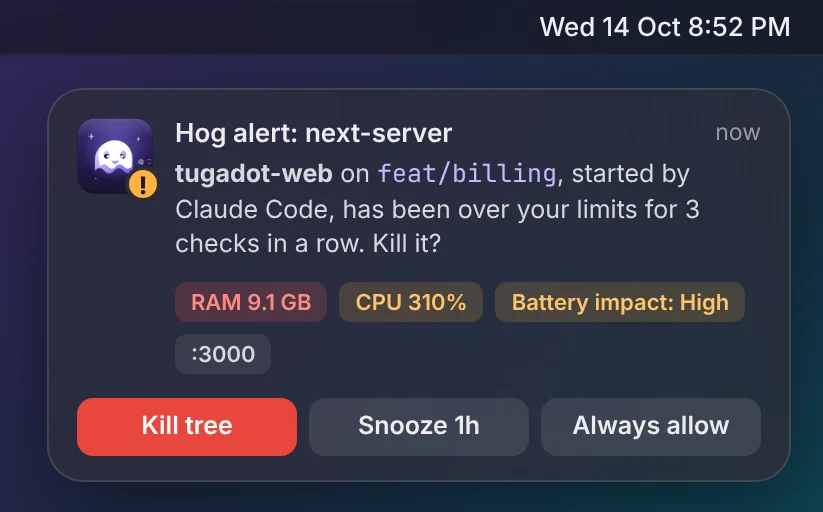
Hog alert mockup. Example data.
FAQ
Questions, answered
Is it Mac only?
Yes. Spookle is built for macOS 14 and later, on Apple silicon and Intel. Windows isn't planned for now.
Is it safe? Will it kill something I'm using?
Spookle only ever touches your own processes, never system ones or another user's. It has a built-in protected list (Apple and system processes, the app you're using, live agent sessions and your shells), and you can protect anything else with a right-click. Bulk kills show you exactly what will stop and what gets skipped before anything happens, and every kill is logged.
Does my data leave my Mac?
No. Spookle runs locally. There's no account, no telemetry and no analytics. Process info and history stay on your Mac. The only network calls are update checks and, if you upgrade, a one-time licence activation.
Which AI agents does it work with?
Every agent that leaves processes behind. It recognises Claude Code, Cursor, Codex and Gemini out of the box, along with common MCP servers and dev tools like Next.js and Vite. Leftovers it can't attribute are labelled "Unknown agent".
Why not just use lsof and kill -9?
lsof shows PIDs, not projects, and it never finds orphans that don't hold a port. Spookle shows where each process came from and stops the whole tree safely.
How do I fix "port 3000 is already in use" on Mac?
In Terminal, run lsof -i :3000 to see which process holds the port, then stop it with kill and its PID (for example kill 12345). If it won't quit, kill -9 forces it, but that skips cleanup and can leave its child processes running. Once Spookle is out, it does this for you: it shows which project and branch own :3000 and stops the whole process tree safely in one click.
What about battery?
Spookle is designed to stay out of the way: it checks every few seconds and aims for under 1% CPU when idle. Its whole job is to give you RAM and battery back.
When can I get it, and what will it cost?
It's in development now. There will be a free version, and a paid Pro upgrade with the automation and alerts, sold as a one-off purchase rather than a subscription. Join the waitlist and we'll email you once, when it launches.

Be first to catch your ghosts
One email when Spookle launches. That's it.